


The Setup
There is no greater test of a friendship than trying to configure a network share. After a multi-hour struggle to transfer files too large for Discord, stumbling over technical hiccups that should have been trivial, it was a reminder of how much user experience matters for setting up something like network shares. That specific frustration was front and center as we headed to Waterloo for Hack Canada.
Arriving at Hack Canada
At Hack Canada last weekend, our team focused on simplifying the process of setting up and interacting with network shares using Tailscale. Our primary objective was to reduce the common friction associated with network shares, from initial setup and connection to the actual sharing of files.
To achieve this, we developed a new interface for the existing Taildrive feature. We were keen to explore the drive feature and, after speaking with Jay and Mike at the Tailscale sponsor booth, we learned it hadn't been a receiving much attention from the community so we wanted to improve it.
Coding
So we moved forward and put our heads together to solve the problem. During the hackathon, we primarily spent our time figuring out how we wanted to interact with the current drive solution that Tailscale offers. We looked at Google Drive's UI for inspiration and wanted our design to feel familiar and intuitive. Essentially, our goal was for users to be able to locate core features exactly where they expected them to be, allowing them to focus on using the tool rather than learning how to use it.
We used a combination of Claude Code and Figma to get our design and implementation down. We thoroughly tested a lot of the edge cases:
- Not allowing the deletion of shares
- Displaying proper thumbnails for content
- Handling the requests for downloads and sharing
- Figuring out how to generate and save the one time passwords
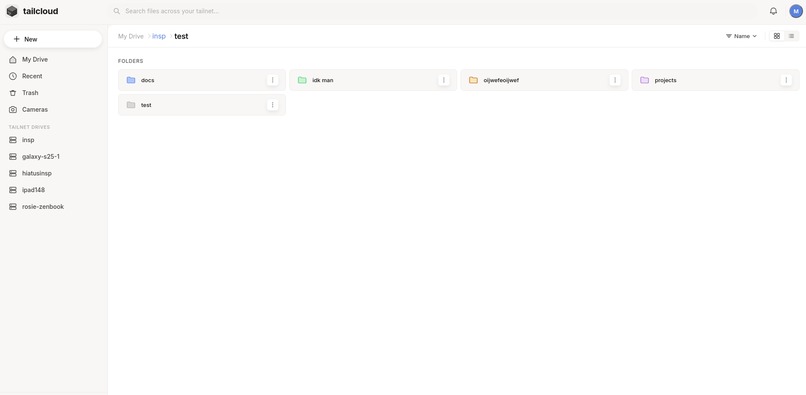
The Tailcloud folder browser – navigating drives across your tailnet
With all of that done, we were ready to move on to the second part of our project, applying Taildrive to a tangible, real-world use case.
Part 2: TailTV
With our Tailscale drive web interface working, we wanted to leverage Tailscale to create a secure monitoring network for our team. This idea felt especially relevant in light of recent public discussions surrounding privacy, surveillance, and how customer data is being stored and shared. We saw that Tailscale could be potentially used as a way of securely connecting a monitoring solution, while also integrating with the drive above for storing recorded files.
That being said, we approached the solution similarly as before, taking time to have fun with the design and the user experience before diving into the code.
Getting the Win
So what did we end up with? By the end of the weekend, we had built a tool that lets users easily set up, explore, and download files from a network of devices connected through Tailscale. Our interface simplified how users interact with Taildrive, while TailTV demonstrated how that same system could be used in a real-world application, like supporting a secure monitoring setup with built-in storage.
It was a lot of fun pitching the project and demoing all the fun interactions we built. Our project ended up winning first place in the Tailscale track challenge, which was an awesome way to wrap up the weekend.
In the process, we learned a lot about Tailscale's capabilities and ended up creating a project we're really proud of, one that we hope could eventually make its way into production (stay tuned for that PR).